
Alternate Mapping Properties Pages
The Fractal Science Kit fractal generator Alternate Mapping pages are found under the Mandelbrot / Julia / Newton page and hold properties that control the collection of data associated with the Mandelbrot fractal orbit. During the orbit for Mandelbrot fractals, you can activate the collection of additional data that you can access from the Color Controllers.
See also:
Alternate Mapping

The Alternate Mapping section contains a single property, Type, which controls the type of data that you wish to collect and is one of the following values:
- <None>
- Instructions
- Exponential Smoothing
- Exponential Smoothing (Shape Value)
- Log Smoothing
- Escape Angle
- Minimum Value
- Minimum Shape
- Average Value
- Blended Value
- Orbit Trap
- Orbit Trap Minimum
- Orbit Trap Value
- Transformed Shape Minimum
- Transformed Value Minimum
- Transformed Value Average
- Orbit Trap Statistic
Setting Type to <None> disables the orbit data processing and is the default setting. Since this processing is performed during the fractal orbit, it is very time consuming and should be disabled if you are not planning to use the data in the Color Controllers. Each of the remaining settings activates the data collection processing. Depending on your choice, a different set of dependent pages is shown in the page hierarchy.
If you set the mapping to Instructions, a Program Editor for an Alternate Value is displayed in the page hierarchy under the Alternate Mapping page. This setting is the most flexible since it provides you with full control over the data collection processing. The remaining settings are less flexible but highly optimized. Many of these settings provide additional pages in the page hierarchy that control different aspects of the data collection.
Alternate Value Normalization
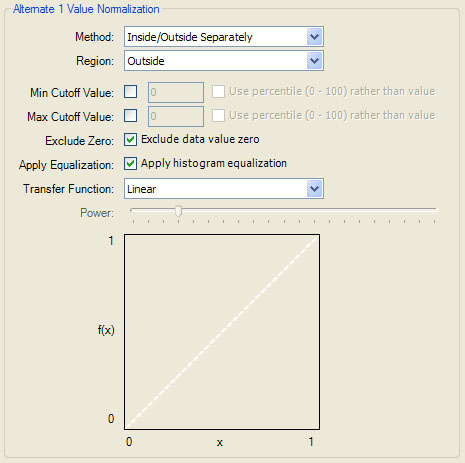
The Alternate Value Normalization section controls the Data Normalization applied to the associated alternate value.
Surface Normal (Alternate Value)
The Surface Normal (Alternate Value) section controls the surface normal vector calculation based on the alternate value. The surface normal vector is used in the 3D Mapping section of the Classic Controllers properties page to support a 3D lighting model based on the alternate value.
The surface normal vector at each point is based on the alternate value at the point in conjunction with values at 2 adjacent points. These 3 values are taken as heights on the surface defined by the complex plane. The properties in this section control the selection and processing of these points/values.
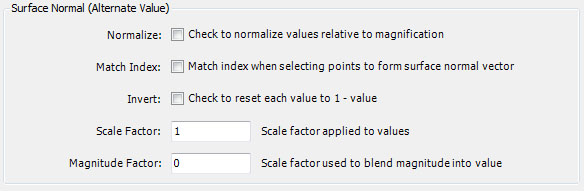
Normalize is a Boolean that, when checked, normalizes the values relative to the magnification of the image. Try checking/unchecking this property to determine which gives the best results.
Match Index is a Boolean that, when checked, ensures the alternate value Index for the 2 adjacent points match that of the associated point. This can sometimes be used to remove lines in the image at the transition between different areas associated with the Index.
Invert is a Boolean that, when checked, resets each value to 1-value. This reverses the heights at each point; i.e., high points become low points and low points become high points.
Scale Factor is a value greater than 0 used to scale each value. Values greater than 1 amplify the associated heights, resulting in sharper peaks. Values less than 1 smooth the associated heights. If you find it necessary to reduce the Scale Factor as you zoom in to achieve the best results, try checking Normalize described above.
Magnitude Factor is a scale factor used to blend the point's magnitude into the value. A large Magnitude Factor can cause the magnitude to dominate the resulting blend and should normally be avoided. A negative Magnitude Factor blends the point's inverted magnitude into the value. Use 0 (the default) to disable the blend. I recommend leaving Magnitude Factor set to 0 until you find something interesting, and then try a small positive or negative number.
You can adjust these properties along with the properties in the Alternate Value Normalization section, to control the resulting 3D lighting effects provided by the Classic Controllers. Note that the Alternate Value Normalization properties Apply Equalization, Transfer Function, and Power, have a significant influence on the resulting surface normal calculation.