
Texture List Control Overview
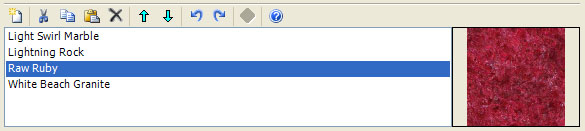
The Fractal Science Kit fractal generator Texture List Control is found on Classic Controllers, Orbit Trap Controllers, and Orbital Controllers. It maintains an ordered list of Textures available to the controller. Each texture in the list is displayed using the name of the associated texture file without the file extension. If the texture file no longer exists or cannot be loaded, the name will also include the text [error loading file] and a default texture (a white box) is used. You should replace these items or remove them from the list. To replace a texture in the list, simply select it and click the Repair toolbar button and select the replacement. The controller can access the textures in this list using the Texture Functions.
The Texture List Control is divided into 2 panes, the list pane and the preview pane. The list pane (the left pane) contains the ordered list of textures. The preview pane (the right pane) contains a preview for the currently selected texture. If the list selection is empty or contains more than 1 item, the preview pane is empty.
The Texture List Control has 2 main functions. First, it is used to maintain the list of textures. This includes adding textures to the list, deleting textures from the list, and moving textures up/down in the list. These operations are performed by selecting 1 or more textures in the list pane and executing one of the list editor commands. For example, to remove textures from your list you would select the textures to remove in the list pane and execute the Delete command.
The second function of the Texture List Control is to preview a texture. If a single texture is selected in the list pane, the texture's image is displayed in the preview pane.
Adding Textures to the List
Several of the built-in Color Controllers require that you add 1 or more textures to the Texture List Control before you can display the fractal. There are 2 ways ways to do this.
To add a texture found on your computer, click the New toolbar button to display the Open Textures dialog. Then, navigate to the folder where you store your textures, select 1 or more files to add to the list, and click Open. The textures you selected are added to the list just before the 1st selected texture or at the end of the list if the selection is empty.
If you want to copy a texture from another color controller, navigate to the color controller and select the texture you want to copy and click the Copy toolbar button on the Texture List Control to copy the selected texture to the clipboard. Then navigate back to the original color controller and click the Paste toolbar button on the Texture List Control to paste the texture found on the clipboard into the list just before the 1st selected texture or at the end of the list if the selection is empty.
There are many textures available on the Internet. Try searching for seamless textures as a starting point.
A good source for seamless textures is Genetica Viewer by Spiral Graphics. Genetica Viewer is a free application for rendering seamless textures that were created in Genetica. I highly recommend that you download Genetica Viewer. The download includes hundreds of seamless textures plus editing functionality to generate countless different variations of each texture.
There is also a nice set of public domain textures found at Public Domain Textures.
Toolbar

All operations are performed using the toolbar buttons above the list. Place the mouse pointer over each button to see the associated command. The commands (in order) are:
-
New displays the Open Textures dialog used to add 1 or more new texture to the bottom of the list.
-
Cut deletes the selected textures from the list and places them on the clipboard.
-
Copy copies the selected textures to the clipboard.
-
Paste pastes the textures found on the clipboard into the list just before the 1st selected texture or at the end of the list if the selection is empty.
-
Delete deletes the selected textures from the list.
-
Move Selection Up moves the selected textures up in the list of textures.
-
Move Selection Down moves the selected textures down in the list of textures.
-
Undo is used to undo the last change to the texture list.
-
Redo is used to redo a change you previously undid!
-
Repair displays the Repair Texture dialog used to select a texture to replace the broken texture. Repair is disabled unless the selection contains a single broken texture.
-
Open Documentation opens the documentation in your browser to this page!