
Newton Trap Relief Examples

Oil and Water |
 Rings
of Fortune |
 Rings of
Fate |

Gateway to Olympus |
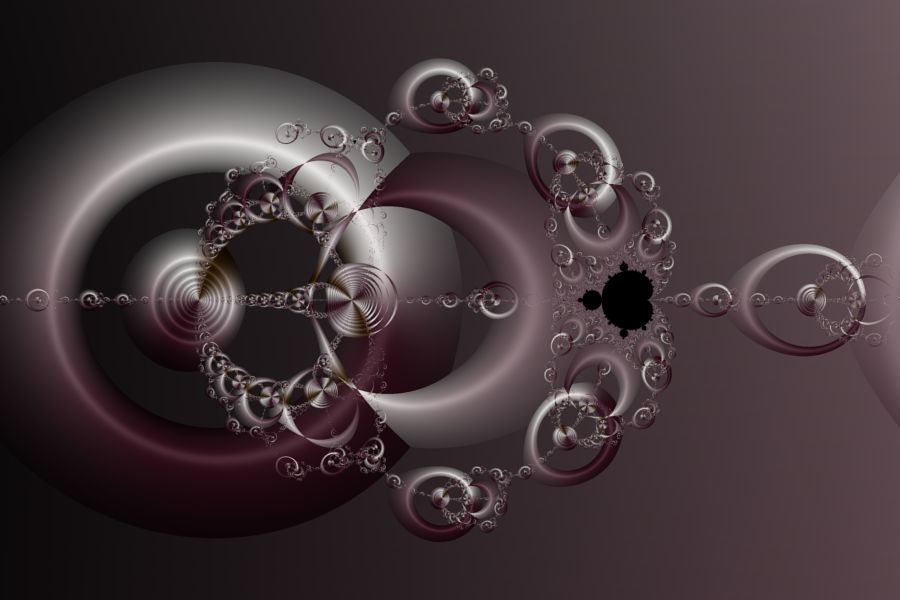
The Newton Trap Relief examples are Mandelbrot fractals with equations based on Newton's Method. They display a 3D relief based on a Circle shape transformation.
Note the following:
| Example | Fractal Type | Fractal Equation |
| Newton Trap Relief 01 | Mandelbrot Fractal | Newton Poly 4a |
| Newton Trap Relief 02 | Mandelbrot Fractal | Newton Poly 4b |
| Newton Trap Relief 03 | Mandelbrot Fractal | Newton Poly 4b |
| Newton Trap Relief 04 | Mandelbrot Fractal | Newton Poly 4b |
In the remaining sections, when I refer to the equation, I will use Newton Poly 4b, but you should use the equation for the example you are working with.
Zoom In/Out
Zoom In or Zoom Out to examine different parts of the fractal.
Execute the Home command on the View menu of the Fractal Window to reset the fractal to the default position/magnification, and then Zoom In to other areas.
Remember that as you Zoom In, you may need to increase the Max Dwell property found in the Orbit Generation section of the General page.
Play with the Fractal Equation's Properties
You can change the equation's properties for more variations.
Select the equation's properties page:
General
Mandelbrot / Julia / Newton
Fractal Equation: Newton Poly 4b
Properties
Play with the equation's properties.
Explore the Julia Fractals
You can use the Preview Julia command to explore the Mandelbrot's many different Julia Fractals. This is a common technique that can be used to generate lots of different Julia fractals from a single Mandelbrot image.
Execute the Home command on the View menu of the Fractal Window to reset the Mandelbrot fractal to the default position/magnification, and use the Preview Julia command to explore the Mandelbrot's many different Julia Fractals. See Working with Julia Fractals for details.
Change the Fractal Equation
You can change the Fractal Equation used to generate the fractal.
Select the Fractal Equation:
General
Mandelbrot / Julia / Newton
Fractal Equation: Newton Poly 4b
Change the Based On property to one of the following Fractal Equations:
- Newton 1
- Newton 2
- Newton 3
- Newton 4
- Newton 5
- Newton 6
- Newton 7
- Newton 8
- Newton 9
- Newton 10
- Newton 11
- Newton 12
- Carlson - Newton 1
- Carlson - Newton 2
- Carlson - Newton 3
- Newton Composite Function
- Newton Poly 4a
- Newton Poly 4b
- Newton Poly 4c
- Newton Poly 5a
- Newton Poly 5b
- Newton Poly 5c
- Newton Poly 5d
- Newton Poly 6a
- Newton Poly 6b
- Newton Poly 6c
- Newton Poly 7a
- Newton Poly 7b
- Newton Poly 7c
Then execute the Home command on the View menu of the Fractal Window to reset the Mandelbrot fractal to the default position/magnification. Zoom In or Zoom Out to examine different parts of the fractal.
Remember to navigate to the properties page for the equation (found under the equation in the page hierarchy) and play with the different properties found there. Many of the equations support properties that can be used to generate lots of different variations.
Change the Shape Transformation
The 3D relief is based on a Circle shape transformation.
To change the shape transformation applied to the fractal, select the Shape Transformation:
General
Mandelbrot / Julia / Newton
Alternate Mapping 1: Minimum Value
Shape Transformation
Change the properties on this page to try out different shapes.
The Shape Transformation defines a transformation based on a shape or a blend of 2 shapes. See Shape Transformation for details.
Change the Transformation
You can apply a transformation to the fractal.
Execute the Home command on the View menu of the Fractal Window to reset the fractal to the default position/magnification before you adjust the transformation. Then change the transformation and Zoom In to interesting areas of the transformed image.
To apply a transformation to the fractal, select the Identity transformation:
General
Mandelbrot / Julia / Newton
Transformation
Identity
Change the Based On property to select a transformation and then open the transformation's properties page (found under the transformation in the page hierarchy), and play with the transformation's properties. See Transformation Support for details.
Play with Color
To play with color, select the color controller's properties page:
General
Mandelbrot / Julia /
Newton
Classic
Controllers
Gradient Map - Atan 1 (Alternate Mapping 1)
Properties
Change the properties to change how the colors are mapped onto the image.